When installing a new server/workstation with Server 2008 R2 or Windows 7. I’m having a strange problem.
For instance, my D partition on my laptop (which runs Windows 7) has default the built in USERS group with right to read the partition. Oké lets remove those rights. Now the partition has only Administrators and System with Full Control. But when opening the partition we are getting a Access Denied warning :?.
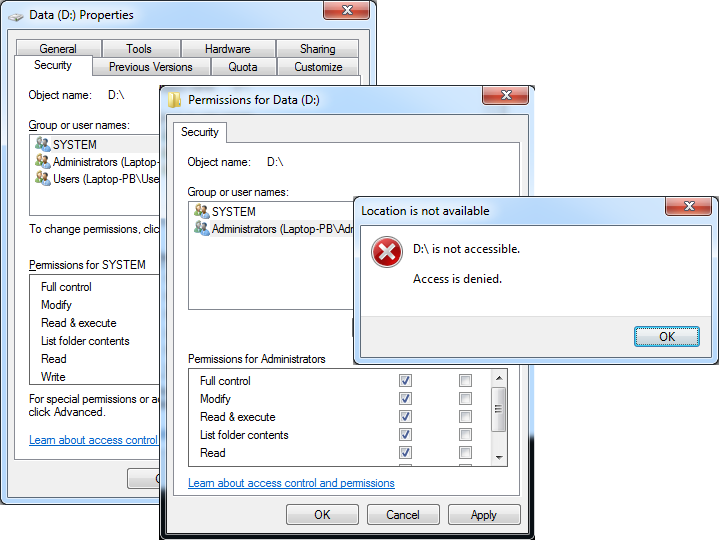
How is that possible? Well, the explorer process is still running in ‘User’ mode. When opening the explorer in ‘Admin’ mode we still getting the Access Denied warning.
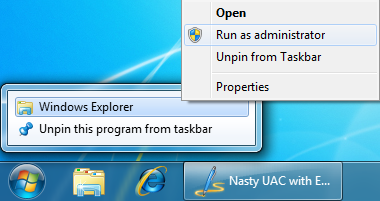
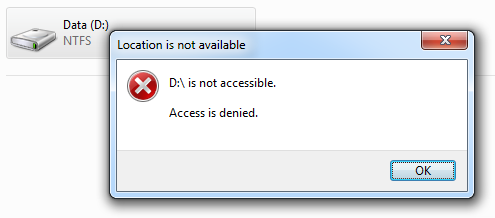
Why? Well, actually the explorer isn’t started in elevated mode. But only the first process. That triggers a DCOM to open the Explorer, witch runs in ‘User’ mode 😉
How do we disable that? First open regedit en navigate to: HKEY_CLASSES_ROOT\AppID\{CDCBCFCA-3CDC-436f-A4E2-0E0207520C2}
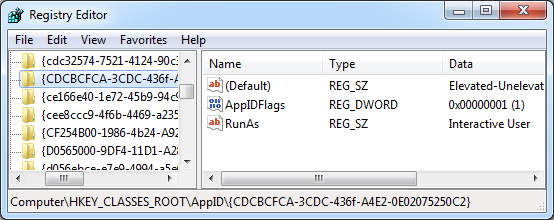
Rename the RunAs to something else, like: _RunAs (Become owner first ;))
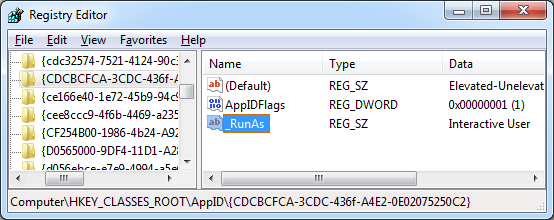
<
p align=”left”>And now it’s possible to open the explorer in elevated mode. And it’s possible to set the correct permissions without adding your own account first.
Thanks for this! I looked everywhere for a solution and finally found your post. I wish MS would make this the default.
Explorer can run as admin but when you close the window, the admin Explorer process doesn’t cleanly exit. Have to terminate it.