We all know the little ipmitool or smcipmitool tools to script some commands against a node. But did you know there is a native PowerShell cmdlet you can use as well?
On the Microsoft website we can find all the cmdlets we can use: https://learn.microsoft.com/en-us/powershell/module/pcsvdevice/?view=windowsserver2025-ps
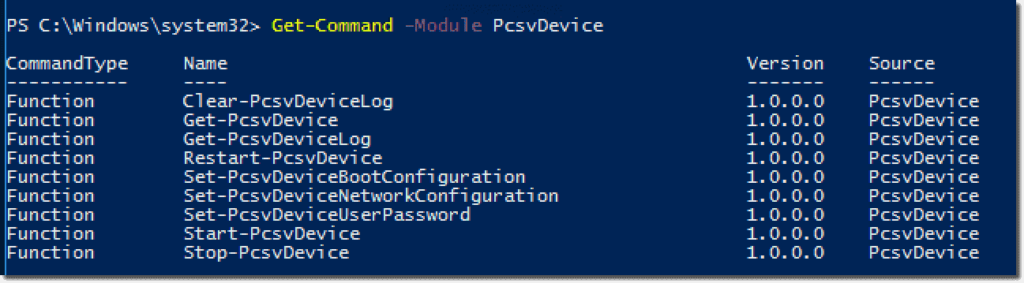
Lets create some PowerShell and see the power:
- Start a node:
# Set variables:
$Password = "nutanix/4u"
$USer = "ADMIN"
$IPAddress_Node = "10.0.6.1"

# Create the credentials:
$EncryptedPassword = ConvertTo-SecureString -String "$Password" -AsPlainText -Force
$Credential = New-Object -TypeName System.Management.Automation.PSCredential -ArgumentList $User, $EncryptedPassword

#Start a node:
Start-PcsvDevice -TargetAddress $IPAddress_Node -ManagementProtocol IPMI -Credential $Credential -Confirm:$false=
2. Shutdown a node:
Stop-PcsvDevice -TargetAddress $IPAddress_Node -ManagementProtocol IPMI -Credential $Credential -Confirm:$false
3. Restart a node:
Restart-PcsvDevice -TargetAddress $IPAddress_Node -ManagementProtocol IPMI -Credential $Credential -Confirm:$false
4. Get some info from the node:
$Info = Get-PcsvDevice -TargetAddress $IPAddress_Node -ManagementProtocol IPMI -Credential $Credential

Results:

TargetAddress             Manufacturer              Model                     SerialNumber    EnabledState
-------------             ------------              -----                     ------------    ------------
10.0.6.1                  Supermicro                NONE                      ZM##########    Enabled
5. Get the device log:
$DeviceLog = Get-PcsvDeviceLog -TargetAddress $IPAddress_Node -ManagementProtocol IPMI -Credential $Credential

Results: (Just a snip)

Caption              : Sensor 12 event with offset 04 (System Event)
Description          : (I2C Slave Addr 16, Channel 0, LUN 0): Sensor 12 event with offset 04 (System Event)
Caption              : Sensor 12 event with offset 04 (System Event)
Description          : (I2C Slave Addr 16, Channel 0, LUN 0): Sensor 12 event with offset 04 (System Event)
ElementName          : PCSV Device Log Record
InstanceID           : SEL Record Instance 50
Locale               :
PerceivedSeverity    :
RecordData           : *0032*02*672B4CEE*0020*04*12*FF*Assertion*6F*04*03*FF
RecordFormat         : *uint16 recordID*uint8 recordType*uint32 timestamp*uint16 generatorID*uint8 evmRev*uint8 sensorType*uint8 sensorNumber*string assertionDirection*uint8 eventType*uint8 even
                       tData1*uint8 eventData2*uint8 eventData3
CreationClassName    : MSFT_PCSVLogRecord
DataFormat           : *uint16 recordID*uint8 recordType*uint32 timestamp*uint16 generatorID*uint8 evmRev*uint8 sensorType*uint8 sensorNumber*string assertionDirection*uint8 eventType*uint8 even
                       tData1*uint8 eventData2*uint8 eventData3
LogCreationClassName : MSFT_PCSVLogRecord
LogName              : PCSV Device Log
MessageTimestamp     : 6-11-2024 12:03:10
RecordID             : 50
RawData              : {50, 0, 2, 238…}
PSComputerName       :
6. Clear the device log:
Clear-PcsvDeviceLog -TargetAddress $IPAddress_Node -ManagementProtocol IPMI -Credential $Credential -Confirm:$false
Unfortunately we cant use all the PcsvDevice cmdlets for IPMI but this simple one will get you started creating cool scripts. Like this one I use for my trainings labs:
Discover more from Jeroen Tielen
Subscribe to get the latest posts sent to your email.