During my consultancy journey at different companies I have seen many different setups for Nutanix Micro segmentation (Flow). With Flow you can create security policies to secure network traffic between virtual machines (and outside the cluster) without relying on traditional network firewalls. This is often called east-west firewalling.
In this blogpost I will give you my insights on the setup which works the best for most of the customers I’ve been to, to implement this feature.
Please participate in this blogpost by giving comments.
This will make this post more powerful when more best practices are added.
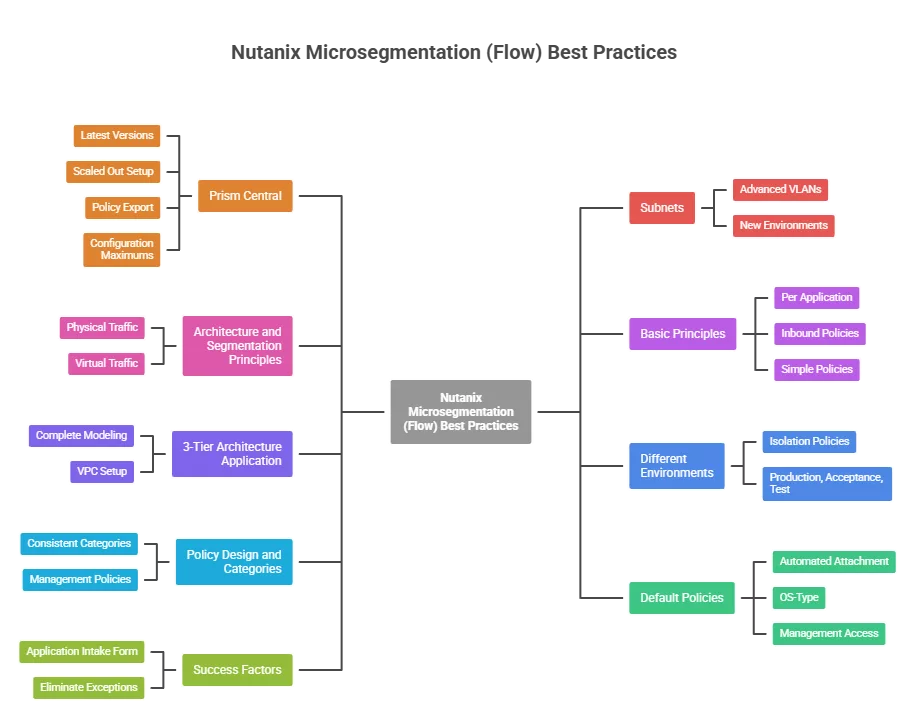
Prism Central:
- Make sure you are running the latest versions of the product. With the release of Prism Central 7.5 there are a lot of improvements in the network security stack. (Release notes 7.5)
- As Flow is being managed by Prism Central make sure your Prism Central is a scaled out setup (3 PCVMs).
- In Prism Central you can export your current security policies. Make sure you export them when changes has been done. This makes sure you always have a backup which you can restore.
- There are configuration maximums for flow. Learn them. (Configuration Maximums)
Subnets:
- Make sure you migrate the basic vlans to advanced vlans. Security policies only work on advanced vlans. (In the older versions it was possible to do it on basic vlans as well). The migration is straight forward and can be done via a wizard in Prism Central.
- If you are building a new Nutanix environment start with creating the subnets directly in advanced mode. If you are implementing Flow on an already running environment then migrate 1 subnet at the time and create security policies per application in the environment.
Architecture and Segmentation Principles:
- Physical traffic (meaning from a source outside the Nutanix environment):
- This traffic is being handled by the physical firewall (for example fortigate, palo alto, etc)
- In Flow there will be a inbound security policy (within the application it is securing) to allow all traffic
- This because the traffic is already being secured via the physical firewall and doing extra firewalling in Flow will increase complexity and double management
- Virtual traffic (meaning from a source inside the Nutanix environment) is being firewalled with Flow
Basic Priciples:
- Create security policies per application
- Work with inbound policies only
- In some cases outbound policies are required as well, these exceptions will happen 😉
- Keep your security policies as simple and generic as possible
- Try to avoid “any-any” rules. Only for the traffic which is already being firewalled by the physical firewall
3-Tier Architecture application:
- Model these applications complete in Flow with 1 security policy
- Ideal setup: 3-Tier application in its own VPC
Different Environments:
- Create isolation policies between the different environments, so they cant talk to each other:
- Production
- Acceptance
- Test
Policy Design and Categories:
- Use consistent categories:
- Applications:Domain_Clients
- Applications:Domain_Controllers
- Create a management policies set, for example: Applications:Management
- This will add RDS/SSH (for example) access from selected clients (Management workstations) to allow remote access
- This can be an element of the default policy set attached to each VM
Default Policies:
- Automate (with playbooks) the connection of the default policy set to a virtual machine
- Can be attached via:
- OS-Type
- Management access
- Backup (for example with HYCU)
- Example to automatically attach categories: Link
Success factors:
- Flow will only work correctly if there is an application intake form
- New applications MUST use the form to have all firewall requirements documented prior deployment
- Try to eliminate exceptions as much as possible