The Citrix Receiver can use a lot of authentication methods. When you implement the fast connect API as described here: https://developer-docs.citrix.com/projects/fast-connect-api-for-receiver-for-windows/en/latest/setting-up-your-environment/ You notice that you have to enable HTTPBASIC within the registry. If you are familiar with this setup you probably know that the other authentication methods will not work anymore. There is limited to none documentation on how to enable those other authentication methods.
This blog post wil describe howto enable specific authentication methods in the Citrix Receiver. If you default install the receiver all authentication methods will be allowed only the HTTPBASIC isn’t. If you enable HTTPBASIC all others will not work anymore.
So here is a screenshot on how to enable every possible authentication method in the receiver. It’s up to you to disable the ones you need or don’t need:
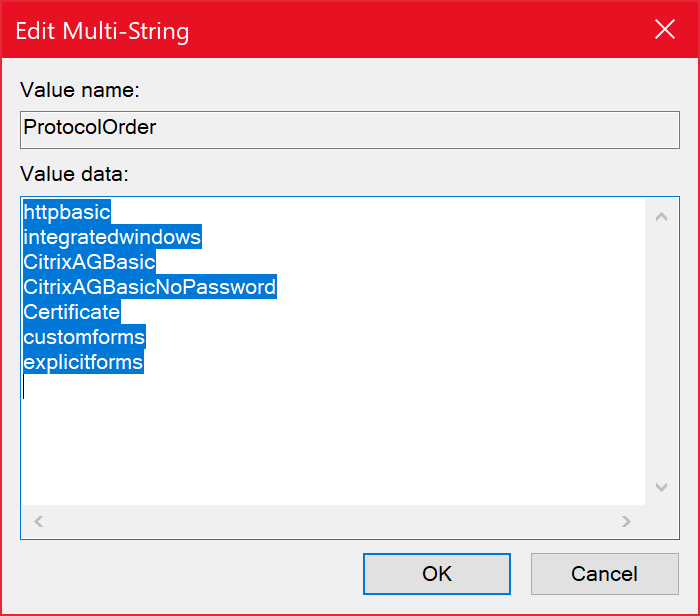
This multistring, named ProtocolOrder, is placed in HKLM\Software\Wow6432Node\Citrix\AuthManager.
Discover more from Jeroen Tielen
Subscribe to get the latest posts sent to your email.